


Telemundo 40 McAllen Noticias
4.4215.00 Reviews
App Specs
- Version
- 8.9
- Updated On
- License
- Free
- Downloads
- 100,000+
- Developer
- NBCUniversal Media, LLC
- Categories
- News & Magazines
- Platform
- Android
Screenshots

 Analysis by AppCompare
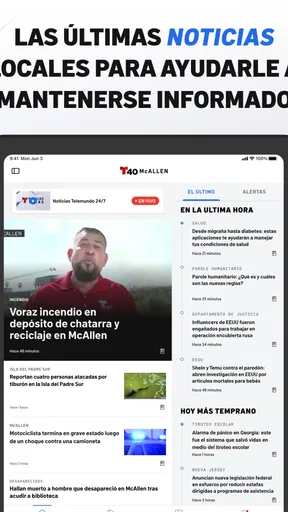
When I want local information from the Rio Grande Valley rather than a broad national news feed, Telemundo 40 McAllen Noticias has a clear purpose: it brings McAllen-area news, traffic updates, and weather information together in Spanish. I found that focus more useful than a general news app when the question was practical—whether a route might be affected, whether local conditions deserved attention, or what was happening close to home.
This is a free News & Magazines app from NBCUniversal Media, LLC, aimed at a Teen audience. It has been available since May 2, 2014, and its current version is 8.9, with support beginning at iOS 9. The app has a 4.4 average from around 951 ratings, while its total reach is over 100 thousand installs. Those figures suggest a reasonably established local-news option, although popularity alone does not tell me whether it suits every reader or every accessibility need.
How clearly the app presents local information
I find the app’s local focus most useful when I want to understand what is happening around McAllen without first sorting through national headlines. In this section, I look at how that emphasis can make a quick check feel more purposeful, while also noting why a narrow regional lens may not work for everyone.
Readability and navigation for everyday news checks
The strongest design decision is the narrow local focus. Instead of making me sort through national headlines to find something relevant to McAllen, the app centers the information people in that area are most likely to check: local reporting, traffic, and weather. That makes the first decision easier. I am not asking, “Which section contains my city?” I am starting with a service built around it.
That focus can also help people who find large, crowded news platforms tiring. A national app may offer more stories, video, opinion, live updates, and categories than I need. More choice is not automatically better when I only want a quick local update. Here, the subject matter is more predictable, which can reduce the mental effort involved in deciding where to begin.
For a short reading session, I would use it in a simple sequence: check the local headlines first, move to traffic before leaving, and then look at weather when planning the rest of the day. This is more efficient than opening several unrelated apps. It also makes the product especially practical for residents who want a regional news habit rather than a broad media dashboard.
There is an important trade-off, however. A focused local app is only as useful as its local relevance to the reader. Someone outside McAllen or the surrounding area may find the narrow geographic scope limiting. A national news reader, a statewide outlet, or a general weather service could be a better primary choice for people who regularly follow several cities or need wider coverage.
Worth Reading Before You Choose

EA SPORTS FC Mobile 26 Is a Bigger Football Game, but It Takes Time

Flipboard Shows What News Apps Must Do Beyond the Feed

Switching to Android Auto Means Rethinking Your Driving Routine

Google Calendar Makes a Crowded Week Easier to Manage

Ludo King Makes the Most of the Minutes Between Plans

Baby Panda World Brings Quick Play to Modern Phones, but Its Game Library Feels Busy
Why local context matters more than a large headline count
I would not judge this app by how many subjects it covers. Its value lies in reducing the distance between the information and the decision I need to make. A local traffic item can matter more to a daily commuter than several national stories, and a regional weather update can be more useful for planning errands than a general forecast that does not reflect nearby conditions.
That makes the app a good companion for routines. I can imagine checking it before driving across the area, during a break at work, or after hearing about a developing local situation. The experience is less about browsing endlessly and more about returning for a specific reason. Readers who enjoy long-form national reporting, international coverage, or a large opinion section may prefer a full news platform instead.
The Teen content rating is also worth keeping in mind for households. It does not make the app unsuitable for adults or older teenagers, but it means parents should treat it as a news source rather than an automatically filtered children’s product. News can involve serious events, and the audience rating should not be interpreted as a promise that every story will feel comfortable for younger readers.
Practical reading habits for different abilities
For readers with low vision, I would make the phone’s own text-size and display settings part of the setup rather than relying on the app alone. Larger system text, stronger contrast, and a less distracting display can make headlines easier to scan. The useful test is not whether the app looks comfortable at its default appearance, but whether the important words remain readable after the device has been adjusted for the person using it.
People who process information more slowly may benefit from checking one area at a time instead of trying to absorb every headline. I would begin with weather or traffic, make the immediate decision, and only then read general news. This turns the app into a task-oriented tool rather than an information stream that demands constant attention.
For someone who finds dense text difficult, the local focus helps, but it does not remove the basic demands of news reading. Headlines still require interpretation, and a short item may not provide all the background needed to understand a complicated event. I would cross-check important or confusing stories with another trusted source before making a serious decision.
Motor and sensory considerations during use
On a practical level, a news app is often used one-handed, while standing at a bus stop, walking toward a car, or holding a bag. That makes simple navigation more important than decorative design. I found the app’s purpose well suited to brief interactions: open it, identify the relevant local section, and read what matters. Still, anyone with limited reach, tremor, or difficulty with precise taps should test whether the controls are comfortable on their particular device and screen size.
I would avoid using it while driving. Traffic information is useful before a journey or after pulling over, but reading a screen behind the wheel creates a separate safety problem. For a commuter with motor limitations, the best workflow is to prepare before leaving, enlarge the interface through device settings if needed, and avoid depending on repeated live checks during the trip.
Sensory needs also vary. Some readers prefer visual text because audio or video is overwhelming; others need alternatives to sustained reading. I would not assume that every story is equally accessible in every format. If a person depends on captions, screen reading, audio descriptions, or a particular presentation style, the right approach is to test the actual stories and sections they plan to use rather than assuming that a news app’s general purpose guarantees those options.
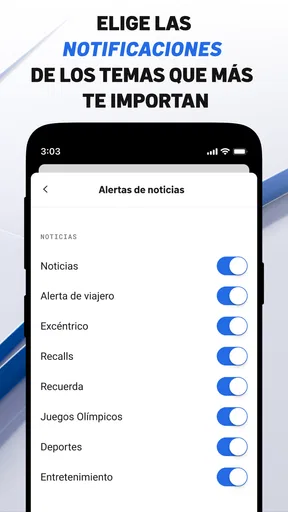
Notifications, alerts, or frequent updates can be helpful for someone who needs timely information, but they can also interrupt concentration or increase anxiety. I recommend treating alerts as a personal setting to manage carefully. Keep only the notices that support a real need, and silence them when they interfere with work, sleep, study, or sensory comfort. The best local-news routine is one that informs without taking over the day.
Situational access: when the app is most useful
The clearest everyday scenario is a morning commute through McAllen. Before leaving, I would check the traffic information, look at the weather, and then decide whether I need extra travel time or different clothing. The benefit is not simply convenience. Combining those checks in one local destination reduces the number of apps and searches involved, which can help when time, attention, or mobile dexterity is limited.
A second use case is a family member who wants to stay aware of local events but does not enjoy general social media. A focused news app can provide a more deliberate way to check regional information without requiring a person to navigate an endless social feed. That may be useful for older adults, people who prefer predictable routines, or anyone trying to reduce distractions.
It can also help a visitor who is temporarily in the McAllen area and needs local context. However, I would not treat it as a complete travel or emergency-planning system. A visitor may still need a map, a dedicated forecast tool, official public-safety sources, and information from other local authorities. The app is best viewed as one accessible starting point for regional awareness, not as the only source for urgent decisions.
For people with limited data, battery, or attention, the app’s focused purpose can be an advantage because it discourages unnecessary browsing. I would still check how much media I choose to open and avoid assuming that every format is equally light on a connection or device. A text-first habit is generally more manageable than repeatedly loading every available item, especially when the phone is older or the network is unreliable.
Where the experience still has barriers
The biggest barrier is geographic. If McAllen-area information is not what I need, the app’s specialization becomes a limitation rather than a strength. Someone looking for national politics, international reporting, business coverage, or news from another region should choose a broader service. Installing it alongside a general news app may make sense, but replacing every other source with it would not.
Another barrier is the nature of news itself. Local reporting can include unfamiliar names, fast-moving events, and emotionally difficult subjects. Readers with cognitive disabilities, language-processing difficulties, or anxiety around breaking news may need a slower routine and another source for context. The app can make local information easier to reach, but it cannot remove the need to interpret, compare, and sometimes wait for a story to develop.
Language is also central to the experience. The app’s purpose is Spanish-language local news for McAllen, which is a major benefit for Spanish-speaking readers who want information in that language. It is less suitable for someone who needs English-first reporting or who wants to switch comfortably between several languages. I would choose it based on the language I actually prefer to read, not simply on the location covered.
Device support deserves attention as well. The minimum operating-system requirement is iOS 9, so compatibility may be broad for older Apple devices, but an older operating system can still affect the overall experience through device speed, display quality, or system accessibility tools. A person who depends on newer platform-level accessibility functions should consider the phone’s operating system as part of the decision, not just the app’s stated minimum.
The free price makes trying it low risk, but “free” does not mean it will suit every reading style. Some people want a calm, text-focused experience; others prefer audio, video, or highly customizable feeds. Before making it part of a daily routine, I would spend a few minutes checking whether the presentation, pacing, and interaction style match the way I actually consume news.
How it compares with the usual alternatives
Compared with a general national news app, this one wins on local relevance and loses on breadth. I would open it when McAllen traffic, weather, or nearby reporting is the priority. I would open the national alternative when I need wider context or want to follow stories beyond South Texas. These are different jobs, and expecting one to replace the other usually leads to frustration.
Compared with a dedicated weather app, the local news app offers a broader reason to return because weather sits alongside reporting and traffic. A weather specialist may be better for detailed forecasts or weather-specific tools, while this app is more convenient when I want a quick regional overview. Likewise, a mapping or navigation service may be better for turn-by-turn travel decisions, while this app can provide the local reporting that explains why a route deserves attention.
Compared with social media, the app gives me a more intentional starting point. Social platforms can surface local information quickly, but they also mix personal posts, commentary, rumors, and unrelated material. I prefer a local news app when I want a clearer editorial destination. I would still compare important claims with official sources, especially during emergencies, because no single news feed should carry the entire burden of verification.
Who should use it and who should skip it
I recommend it to McAllen-area residents who want Spanish-language local news, traffic, and weather in one place. It is particularly suitable for people who value a short, repeatable routine: check the local situation, make a practical decision, and move on. Families, commuters, older readers who prefer a regional focus, and people who do not want a noisy national feed may all find that approach comfortable.
I would also suggest trying it for readers who are building a more manageable news habit. The local scope can make it easier to set boundaries around when and why to check the app. Instead of scrolling through every subject available online, I can use it for a morning update, a pre-drive check, or a brief evening review.
I would skip it as a primary news source if I live far from McAllen, need extensive international coverage, require a specialized weather tool, or depend on a particular accessibility format that the app does not handle comfortably on my device. In those cases, a broader or more specialized alternative is likely to serve me better. It may still be worth keeping as a regional supplement, but not as the center of my information routine.
My inclusive verdict after using the local-news approach
Telemundo 40 McAllen Noticias succeeds because it understands a specific need: local information is most valuable when it helps me act. Its combination of McAllen-area reporting, traffic, and weather makes sense for daily routines, and the free access lowers the barrier to trying it. The 4.4 average and over 100 thousand installs indicate that many users have found the service worthwhile, though I would still judge it by my own location, language, device, and reading preferences.
From an inclusion perspective, its focused scope is a real advantage for people who are overwhelmed by broad news platforms, but focus is not the same as universal accessibility. Readability depends partly on device settings, motor comfort depends on the individual phone and user, and sensory or cognitive needs may require a carefully controlled notification and reading routine. I appreciate the practical simplicity, while recognizing that readers who need richer customization or alternative formats should test it closely.
My recommendation is straightforward: if you are in the McAllen area and want Spanish-language local updates without searching through a national feed, give it a try. Use it before travel rather than while driving, adjust your phone’s display for comfortable reading, and keep a second source for detailed forecasts, navigation, or official urgent instructions. Its best quality is not the amount of information, but how directly that information can support a local decision.
Pros
- Covers local news
- weather
- traffic
- and community updates in the Rio Grande Valley.
- Provides Spanish-language reporting tailored to McAllen and surrounding areas.
- Offers breaking-news alerts to help users stay informed throughout the day.
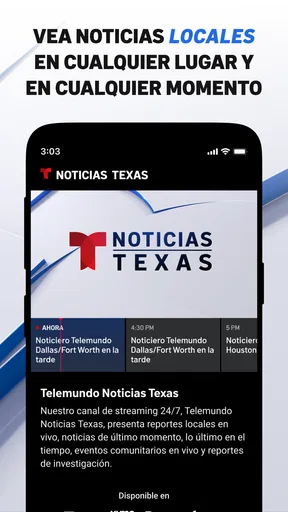
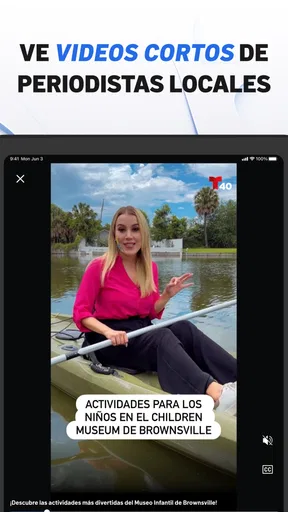
- Includes video reports and live coverage for major regional events.
- Simple layout makes headlines and news categories easy to browse.
Cons
- Some stories may take time to load on slower mobile connections.
- Frequent notifications can feel excessive unless alert settings are adjusted.
- Coverage is mainly regional
- with limited value for users outside South Texas.
- Advertising may interrupt browsing or appear alongside news content.
- Certain live streams or videos may require a stable
- high-speed connection.
FAQs for Telemundo 40 McAllen Noticias
What is Telemundo 40 McAllen Noticias?
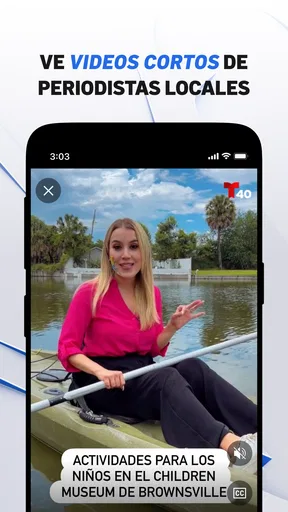
Telemundo 40 McAllen Noticias is a local news app focused on the Rio Grande Valley, including McAllen, Brownsville, Harlingen, Edinburg, and nearby communities. It provides access to local and regional headlines, weather forecasts, traffic updates, videos, live coverage, and stories from the Telemundo 40 newsroom. The content is especially useful for Spanish-speaking users who want news relevant to South Texas.
What type of news and information can I find in the app?
The app typically includes breaking local news, community reports, politics, crime, health, education, entertainment, sports, weather, and consumer information. During important events, users may also find live updates, video reports, severe-weather coverage, and special alerts. Available sections and stories can change throughout the day depending on what is happening in the McAllen and Rio Grande Valley area.
Does Telemundo 40 McAllen Noticias provide weather alerts and forecasts?
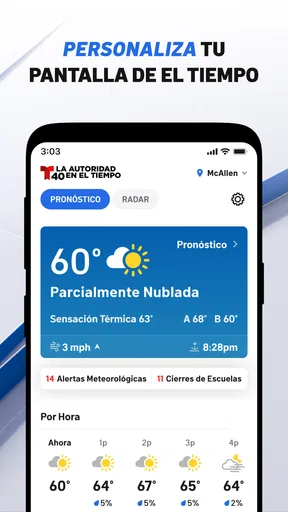
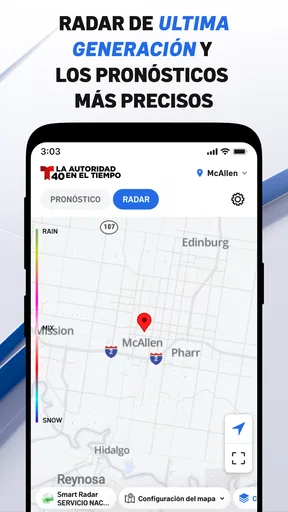
Yes, weather is one of the app’s most useful features for people living in or traveling through the Rio Grande Valley. Users can generally check current conditions, hourly and extended forecasts, radar information, and severe-weather updates. Notifications may also be available for significant storms or emergency conditions, although alert availability can depend on device permissions and regional settings.
Is Telemundo 40 McAllen Noticias free to download and use?
The application is generally free to download, and users can browse much of its news content without paying a subscription. However, it may display advertising, and some video or streaming features can use a considerable amount of mobile data. Before installing, check the current listing in the Google Play Store or Apple App Store for the latest information about availability, in-app purchases, privacy requirements, and supported devices.
Does the app require location access or notifications?
Location access is usually optional, but enabling it can help the app provide more relevant weather information, local coverage, and regional alerts. Notifications are also optional and may be useful for breaking news, severe weather, or important live events. If you prefer greater privacy or fewer interruptions, you can deny these permissions or change them later through your Android or iOS device settings.


